Generic CIP messages
A generic message sends any CIP service to any object, like a CIP Generic MSG instruction in Logix. Use it for
what the drivers don't wrap: drive parameters, module status, the identity of a device, an EDS upload. Any driver
can send one; the CIP driver does nothing else.
| Field | Meaning |
|---|---|
service |
the service code, e.g. 0x0E Get_Attribute_Single, 0x10 Set_Attribute_Single, 0x01 Get_Attributes_All |
class_code, instance |
the object addressed; instance 0 addresses the class attributes |
attribute |
the attribute, if the service takes one |
request_data |
the bytes that follow the request path |
connected |
send over the CIP connection (default; it is opened first if needed), or unconnected |
unconnected_send, route_path |
for unconnected messages, wrap them in an Unconnected Send along the driver's path (or another route) to reach a device behind a bridge |
name |
a name for the result and the log |
The result is like a tag result: the value is the reply data (raw bytes; Python can decode it with data_type)
and a failed reply status is the result's error.
Read an attribute
This reads the product name of the device (Identity object, class 0x01, instance 1, attribute 7, a SHORT_STRING):
from ciplink import CIPDriver, Services, SHORT_STRING

with CIPDriver("192.0.2.10") as drv:
    name = drv.generic_message(
        service=Services.get_attribute_single,
        class_code=0x01,
        instance=1,
        attribute=7,
        data_type=SHORT_STRING,
        connected=False,
        name="product_name",
    )
    print(name.value if name else name.error)     # '1756-EN2T/D'
use ciplink::cip::{CipDriver, CipOptions, GenericMessage};

let drv = CipDriver::new("192.0.2.10", CipOptions::default())?;
drv.open()?;
let reply = drv.generic_message(&GenericMessage {
    service: 0x0E,
    class_code: 0x01u32.into(),
    instance: 1u32.into(),
    attribute: Some(7u32.into()),
    connected: false,
    name: "product_name".into(),
    ..GenericMessage::default()
})?;
match reply.data() {
    Some([len, text @ ..]) => println!("{}", String::from_utf8_lossy(&text[..*len as usize])),
    _ => println!("failed: {:?}", reply.tag.error),
}
using System.Text;
using Ciplink;

using var drv = new CipDriver("192.0.2.10");
drv.Open();
Tag reply = drv.GenericMessage(new Message
{
    Service = 0x0E, ClassCode = 0x01, Instance = 1, Attribute = 7, Connected = false, Name = "product_name",
});
if (reply.IsOk && reply.Value is byte[] data)
    Console.WriteLine(Encoding.ASCII.GetString(data, 1, data[0]));
else
    Console.WriteLine(reply.Error);
#include <iostream>
#include "ciplink.hpp"

ciplink::Cip drv("192.0.2.10");
drv.open();
ciplink::Message m;
m.service = 0x0E;
m.class_code = 0x01;
m.instance = 1;
m.attribute = 7;
m.connected = false;
m.name = "product_name";
ciplink::Tag reply = drv.generic_message(m);
if (reply) {
    const auto& data = reply.value.get<ciplink::Bytes>().data;
    std::cout << std::string(data.begin() + 1, data.begin() + 1 + data[0]) << "\n";
} else {
    std::cout << reply.error->message << "\n";
}
#include <stdio.h>
#include "ciplink.h"

CiplinkDriver *drv = NULL;
ciplink_cip_new("192.0.2.10", NULL, &drv);
if (ciplink_open(drv) == CIPLINK_STATUS_OK) {
    CiplinkMessage m = {0};
    m.service = 0x0E;
    m.class_code = 0x01;
    m.instance = 1;
    m.attribute = 7;          /* negative for none */
    m.connected = false;
    m.name = "product_name";
    char *json = NULL;
    if (ciplink_generic_message(drv, &m, &json) == CIPLINK_STATUS_OK) {
        printf("%s\n", json);  /* {"tag":"product_name","value":{"$bytes":"0b313735362d454e32542f44"},...} */
        ciplink_string_free(json);
    }
}
ciplink_driver_free(drv);
Reach a device behind a bridge
To message a device through a controller's backplane and Ethernet module, give the driver the route to it and send the message unconnected with an Unconnected Send along that route. This reads parameter 41 (Accel Time) of a PowerFlex 525:
from ciplink import CIPDriver, Services, INT

with CIPDriver("192.0.2.10/bp/1/enet/192.0.2.55") as drive:
    param = drive.generic_message(
        service=Services.get_attribute_single,
        class_code=0x93,          # DPI Parameter object
        instance=41,              # parameter 41
        attribute=0x09,           # the parameter's value
        data_type=INT,
        connected=False,
        unconnected_send=True,
        route_path=True,          # along the driver's path
        name="pf525_param",
    )
The other bindings set the same fields (unconnected_send, and route_path left at its default, the driver's
path). examples/generic_messaging.py
has more: writing a drive parameter, an Ethernet module's OK LED and link status, a Stratix switch's power status,
IP configuration and MAC address.
Decoding replies in Python
data_type decodes the reply with ciplink's CIP types: elementary types (INT, DINT, REAL, SHORT_STRING,
STRING ...), arrays of them (INT[4], INT[None] for "all that's left") and structures:
from ciplink import Struct, DINT, STRING, REAL

Reading = Struct(DINT("code"), STRING("name"), REAL("value"))
Reading.decode(data)          # {'code': 80, 'name': 'my name', 'value': 123.45}
Reading.encode({"code": 80, "name": "my name", "value": 123.45})
Every type has encode (a Python value to bytes) and decode (bytes to a Python value). Leave data_type out
for raw bytes, and for services that return no data (Set_Attribute_Single).
Raw messages
For full control, send_connected and send_unconnected (Rust: send_connected_raw, send_unconnected_raw;
C#: SendConnected, SendUnconnected; C: ciplink_send_connected, ciplink_send_unconnected) send bytes you
encoded yourself (service, request path and data) and return the raw reply frame, encapsulation header included.
send_connected uses the open CIP connection and doesn't make the Forward Open itself.
How ciplink got the program name
The Logix driver's get_plc_name is itself a generic message. Rockwell's knowledge base article Obtaining the
Controller's Program Name shows the MSG configuration:
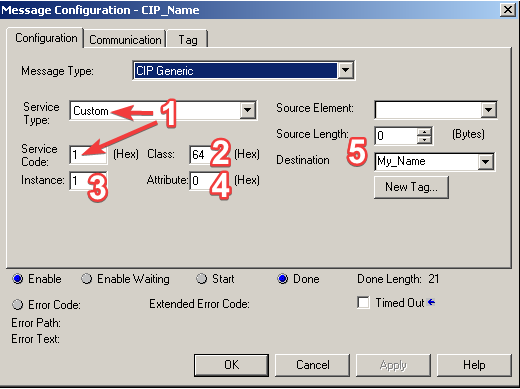
The service is 0x01 (Get_Attributes_All), the class 0x64, instance 1 and no attribute. The reply is stored in a
SINT[50] whose first two bytes are the length and the rest one byte per character:
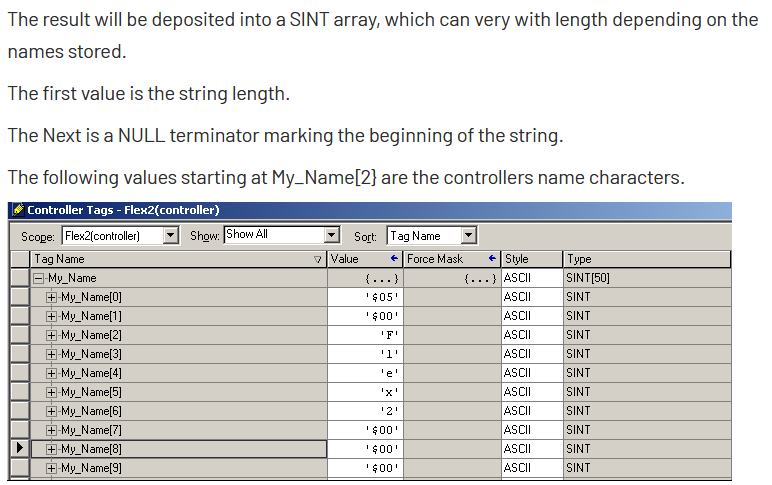
That is the CIP STRING type, so the call is:
plc.generic_message(service=Services.get_attributes_all, class_code=0x64, instance=1,
                    data_type=STRING, name="get_plc_name")
Naming the message (name=) makes it easy to find in a verbose log.